DNS observer
Which names does this house actually resolve? That is the first step toward measuring the services that matter here, not a generic list of sites. The DNS observer answers it from the house's own DNS queries. Nobody's traffic is sniffed or intercepted: the router is configured, on purpose, to forward DNS to the Pi. (How fast the public resolvers answer the Pi's own queries is a different measurement: DNS resolver probes.)
It runs as one container with two pieces:
- AdGuard Home (v0.107.79, filtering off) is the DNS server. It answers on port 53, forwards to encrypted upstreams (DNS over HTTPS by default), and keeps the query log. We reuse it rather than writing a DNS server. It already has what the design needs: DoH, DoT, DoQ and DoH3 upstreams, a plain-DNS fallback, serve-stale caching, and a query log with the upstream, the latency, the response code and whether the answer came from the cache.
- The supervisor is ours. It writes AdGuard's settings, restarts AdGuard when it stops answering, and says whether observations are arriving. When they are not, it says why (see When the observer is not getting information).
LAN devices ──DNS──▶ router ──forwards──▶ Pi :53 (AdGuard Home) ──DoH──▶ 1.1.1.1 / 8.8.8.8
                                               ▲                  └─plain DNS if DoH fails
                     canary every 5 min ───────┘ (supervisor → router → Pi)
Pro edition, opt-in (dns profile). It is off unless you enable it, and
until the router points at it, it changes nothing about the house's DNS.
Setup guide
About 10 minutes. You need the Pro edition running and the router's admin app or page. Keep a phone with mobile data at hand: if something goes wrong, it is how you reach the router's settings to undo step 5, if your router is managed from an app.
The model is router → Pi → encrypted upstream. Your devices keep asking the router for DNS, as they do today, and only the router's own upstream changes. That is one setting, in one place, and one tap undoes it. This guide never changes the DNS server your devices get by DHCP, and never turns on AdGuard's DHCP server.
1. Give the Pi a fixed address
The router is about to send the whole house's DNS to one address. If the
Pi's DHCP lease then hands it a new address, the router forwards to nothing.
In the router, reserve the Pi's current address; hostname -I on the Pi
shows it. Routers call this "DHCP reservation", "static lease" or "address
reservation", and put it next to the DHCP settings.
2. Start the observer
smoking-pi dns enable
This command:
- refuses if something else already listens on port 53 here, such as a Pi-hole or dnsmasq, and changes nothing in that case;
- generates
DNS_ADMIN_PASSWORDif the install predates it (the admin UI's password;smoking-pi passwords --show-secretsshows it); - adds
dnstoCOMPOSE_PROFILESand startsdns-observer, and nothing else; - prints the address to give the router.
smoking-pi dns status now reads starting and then not_receiving. That
is correct: nothing sends queries here yet.
3. Check that the Pi answers, before touching the router
From a laptop on the same network, ask the Pi directly. Use the Pi's
address from step 1; 192.168.1.10 here is only an example:
dig @192.168.1.10 example.com
status: NOERROR and an address in the ANSWER SECTION mean the Pi
resolves. smoking-pi dns test on the Pi checks the same thing from the Pi
side (its first three lines; the router lines fail until step 5, which is
expected here). A timeout means the router
must not point at it yet; see
When the observer is not getting information
and smoking-pi logs dns-observer.
4. Decide on a secondary
| Value | Why | |
|---|---|---|
| Primary | the Pi's address | Queries reach the observer |
| Secondary | 1.1.1.1 (or your ISP's resolver) |
The house stays online if the Pi is down |
Many routers spread queries across primary and secondary, or switch to the
secondary after one slow answer. The observer then sees only part of the
house's DNS, and its state says so (partial). Without a secondary it sees
everything, but when the Pi is off the house has no DNS until the router
gives up on it, which some routers never do. We recommend keeping the
secondary: an incomplete record beats a house without DNS.
5. Point the router at the Pi
Find the setting for the DNS servers the router itself uses. It is often called "custom DNS", "DNS server" under the WAN or Internet settings, or "upstream" or "forwarders". Enter the primary and secondary from step 4 and save. Then leave the settings and open them again: some router apps and pages keep an edit on screen that was never applied, and the first sign is the check in step 6 failing.
This works on routers that answer the house's DNS themselves (a DNS proxy
or forwarder), which is what most home routers do: their devices get the
router's own address as DNS server, and dig example.com on a laptop shows
the router's address on its SERVER: line. If yours names another address, the router
is handing devices a resolver directly. Changing that is the DHCP-direct
mode, which this guide does not cover.
IPv6. Routers with IPv6 often have a second pair of DNS fields for it.
With IPv6 on, the router may send some queries to those servers, which
bypass the Pi, and the state shows partial. The observer listens on IPv4
only by default. Pointing the IPv6 fields at the Pi takes
DNS_BIND=0.0.0.0,:: and a Pi IPv6 address that does not change. Most ISP
prefixes do change, so the simplest choice is to leave the IPv6 fields as
they are.
6. Test it
Right after saving the router setting, on the Pi:
smoking-pi dns test
It checks each link of the path in a few seconds, in order:
OK    Pi DNS server answers: 127.0.0.1:53
OK    answers on the LAN: 192.168.1.10:53
OK    upstreams answer: a unique name, NXDOMAIN in 165 ms
OK    router answers: a unique name via 192.168.1.1, NXDOMAIN in 169 ms
OK    router forwards to the Pi: 10/10 test names asked of 192.168.1.1 arrived here

The DNS path works: devices -> router -> Pi -> upstreams.
The last line is the one that matters. The Pi asks the router for ten
unique names that nobody else could ask, and counts how many arrive in its
own query log. A router that forwards here passes them all on; one that does
not, passes none. Every name the test asks is unique and under the canary
domain, so no cache holds it (NXDOMAIN is the upstream's answer) and the
observer does not count it as the house's traffic: running the test never
turns not_receiving into observing. The command exits 1 when a check
failed, so a script can use it.
| Failing line | What it means | What to do |
|---|---|---|
Pi DNS server answers |
AdGuard is not answering on the Pi | smoking-pi dns status; smoking-pi logs dns-observer |
answers on the LAN |
It answers on loopback only: the router cannot reach it | DNS_BIND must include the LAN address or 0.0.0.0; check the Pi's firewall allows port 53 |
upstreams answer |
The Pi cannot reach its encrypted resolvers | smoking-pi doctor; check the Pi's internet and DNS_UPSTREAMS |
router answers |
Devices asking the router get no answer right now | Fix the lines above; if the router points only at the Pi, set it back to automatic meanwhile |
router forwards, 0/10 |
The router is not using the Pi | Open the router's DNS setting again: it did not save, or it points at another address. Check the address matches step 1 |
router forwards, 0/10, answers itself |
The router answers the test names' suffix itself and never forwards it | smoking-pi config set DNS_CANARY_DOMAIN <a name it forwards>: the default, under home.arpa, if you had changed it; otherwise a name under a domain you own |
router forwards, some/10 (warning) |
The router also sends queries elsewhere: the secondary from step 4, or IPv6 DNS | Expected with a secondary; the status reads partial |
Two things it does not need: rebooting the router, and renewing the DHCP leases of your devices. Devices keep asking the router, as they did before; only the router's own upstream changed, and it applies at once.
If it ends with a note that the Pi's address comes from DHCP, make sure you reserved it (step 1). The router cannot tell the Pi whether it did.
After that, smoking-pi dns status keeps checking on its own: it reads
observing as soon as the house's queries arrive, and its canary asks the
router for one unique name every 5 minutes, so a router that reverts its
setting later is caught within about 15 minutes. The busiest names appear
under the status as the house uses the network.
Checking the path by hand
From a laptop on the same network, with 192.168.1.10 standing for the Pi
and 192.168.1.1 for the router:
| Command | Expected | It shows |
|---|---|---|
dig example.com |
SERVER: is the router's address |
Devices ask the router, as the guide assumes |
dig @192.168.1.10 example.com |
status: NOERROR, an address |
The Pi answers on the LAN |
dig @192.168.1.1 example.com |
status: NOERROR, an address |
The router answers |
dig +short whoami.akamai.net |
Address(es) of the public resolver's egress | Which public resolver the house ends up at: with the router pointed at the Pi, those of the Pi's upstreams (Which resolver answers) |
dig test-$RANDOM.canary.smoking-pi.home.arpa |
NXDOMAIN, and the name in the Pi's query log (admin UI) within seconds |
The router forwards to the Pi: a name nobody else asks, so not cached anywhere. The by-hand version of the test's last line |
Undo
Change the router's DNS back to automatic first, then:
smoking-pi dns disable
In the other order, a router that forwards only to the Pi leaves the house without DNS for as long as the observer is gone.
When the observer is not getting information
Observations stop for three reasons, and all three look the same from inside the Pi: no queries. Each has its own evidence and its own fallback.
The container, or Docker, is down. Nothing on the Pi answers.
- The house: the router's secondary DNS answers. Without one, the house has no DNS.
- Recovery:
restart: unless-stoppedrestarts the container;- the systemd unit brings the stack back when Docker starts;
- inside the container, the supervisor restarts AdGuard if it exits, and kills and restarts it if it stops answering its self-test (every 10 s, 3 misses, about 30 s).
The self-test is an ANY query, which AdGuard refuses locally without
asking an upstream. A test that went upstream would fail during an
internet outage and get a working server killed.
- Detection: status.json carries a heartbeat. A reader that finds it
older than 90 s reports down, with observed_until (the last real query),
so the gap in the data has a start. A stop on purpose (docker stop,
compose down, an upgrade) is written at once as stopped.
Nobody sends queries here: the router was never set, or it reverted. Routers lose custom DNS settings on firmware updates, factory resets and ISP-pushed configurations.
- The problem: a quiet house at 4 a.m. and a router that went back to its ISP's DNS look identical by query count alone.
- The canary: every
DNS_CANARY_INTERVAL(5 min), the supervisor asks the router for a unique name,<random>.canary.smoking-pi.home.arpa. If the router forwards to the Pi, the name shows up in the query log here. - Canaries arriving and no queries means
quiet, a quiet house. DNS_CANARY_MISSES(3) canaries in a row not arriving, and no queries, meansnot_receiving: the router does not send here.- Canaries missing while queries arrive means
partial: the router splits between the Pi and its secondary.
The name is under home.arpa, which RFC 8375 reserves for home networks:
it exists nowhere publicly. A canary that leaks to a public resolver,
after the router reverted, is answered NXDOMAIN and reaches nobody's
authoritative server. It is not under .invalid or .test: routers that
follow RFC 6761 answer those themselves and never forward them, so a
canary there could never arrive and the state would stay partial or
not_receiving on a router that works. smoking-pi dns test says when a
router does that with the name in use.
- With the canary off (DNS_CANARY_VIA=off), silence reads as idle: "I
cannot tell". It never reads as quiet.
Queries arrive but the upstreams fail. AdGuard answers through
fallback_dns (plain DNS to 1.1.1.1 and 8.8.8.8; state
upstream_fallback). If that fails too, recently asked names come from the
stale cache for up to 12 h, and new names fail (state upstream_failing).
States
| State | Live? | Meaning | What to do |
|---|---|---|---|
observing |
yes | Queries are arriving | — |
quiet |
yes | No queries for DNS_QUIET_AFTER (30 min), but the canary still arrives |
— |
partial |
yes | Queries arrive, canaries do not: the router splits across a secondary, or answers the canary name itself | Expected with a secondary DNS; otherwise smoking-pi dns test |
upstream_fallback |
yes | DoH failing; answering over plain DNS | Check the Pi's internet |
upstream_failing |
yes | Upstreams failing; stale cache or SERVFAIL | Check the Pi's internet |
idle |
no | Silence, canary off: cannot tell why | Turn the canary on |
not_receiving |
no | Canaries not forwarded and no queries; or never any query | Check the router's DNS setting; smoking-pi dns test |
server_down |
no | AdGuard not answering; being restarted | smoking-pi logs dns-observer if it persists |
starting |
no | Just started | Wait for the first canary |
stopped |
no | Stopped on purpose | smoking-pi up |
down |
no | No heartbeat (container or Docker down) | smoking-pi up; smoking-pi logs dns-observer |
For whatever uses the observations (target recommendations, next):
status.json's live says whether the data is current. When it is not,
fall back to the last known ranking (still in the query log, marked stale
since observed_until), then to the curated default targets. Never read
silence as "nothing matters in this house".
The DNS wizard
What the house uses, from its DNS. Every DNS_WIZARD_INTERVAL (10 min), the
observer reads what the query log gained since the last pass and keeps, per
hour, how often each service was asked for. A service is a registrable
domain: nrdp.logs.netflix.com counts as netflix.com, and a site under a
shared suffix is its own (user.github.io). A CDN endpoint that embeds a
customer's domain (www.example.com.cdn.cloudflare.net) counts as the CDN,
cloudflare.net: the label in front of the shared suffix is a real
top-level domain with a name before it. A site whose own name is a
top-level domain (www.io.github.io) is taken for one too. For each service it also records:
- the CDN that serves it, from the end of the CNAME chain
(
*.cloudfront.netis one CDN, whoever the customer); - the network (origin AS and organization) of its address, IPv4 or IPv6, looked up locally with originet over CAIDA's RouteViews snapshot and CAIDA's AS Organizations names (see The path to each destination). No lookup is asked of anyone per address, so the summary does not see its own lookups; the only names the observer resolves for this are the download hosts', a few times a month. Until the table and the names are loaded (the first minute after a start), addresses wait for the next pass.
Services are ranked by presence, the number of hours in the last week in
which they were seen. A burst of telemetry counts as one hour, and a cache
hides volume but not presence. The Pi's own traffic is left out: image pulls,
the Cloudflare tunnel, the alert bot, the canary, names that are not on the
public Internet (config-manager, nas.internal), and every name SmokePing
measures, read from its Targets file. The Pi resolves through the router
like everyone else, so without this it would rank its own chores. On the
reference Pi, SmokePing's lookups were a third of all the queries. A name it
measures is looked up about once per TTL, all day and all night, so it would
look present every hour, and the wizard would keep ranking what it has
already adopted. The cost: the house's own lookups of exactly those names
are left out too. Few of them reach the observer anyway, because the Pi's
lookups keep the router's cache of those names warm. The service still
counts through its other names. DNS_WIZARD_EXCLUDE adds more names to
leave out.
The list is right only on a Pi that does nothing but measure
It knows Smoking Pi's own traffic and nothing else. Anything else the
Pi runs (an assistant or its node, a chat bot, a tunnel, a dashboard
renderer, a desktop session) resolves through the same router, so its
lookups count as the house's. Its names then rank as services the house
uses, and a selection built on the ranking would measure them. If the
Pi serves other purposes, add their names to DNS_WIZARD_EXCLUDE
(sudo smoking-pi config set DNS_WIZARD_EXCLUDE .example.com,api.example.net,
which restarts the observer), or move those programs to another machine.
Every query reaches the observer from the router's address, so it cannot
tell them apart by itself.
On its own it changes no target: it shows what the house uses, and how much grouping and cutting would lose. To measure what it selects, see Measuring what the house uses. Open it in Grafana as DNS Wizard:
- The house, as a whole. These numbers carry no names and always go to InfluxDB:
- services and networks seen this week;
- the effective number of each: 1/HHI, how many equally used services or networks would give the same concentration. Far below the plain count means a few dominate;
- the CDNs and networks behind the top 10;
- the share of the top 10 kept since yesterday (churn);
- the Pi's own share of queries.
- Diversity over time. The effective number of services, CDNs and networks, and the share of the week's presence the top 5, 10 and 20 cover. The gap between services and networks is the diversity that grouping by network would hide.
- Top services. Rank, presence, queries, the busiest stable host name (the endpoint that would be measured), CDN and network. The table shows the latest snapshot only, so services that dropped out do not linger in it. It needs the names in InfluxDB:
smoking-pi config set DNS_EXPORT_NAMES 1
Grafana may be reachable from outside, through a tunnel or a shared
address. With names exported, anyone who can open it sees which services
the house uses. smoking-pi config unset DNS_EXPORT_NAMES stops
exporting them; names already written stay in InfluxDB until its
retention drops them.
The first pass reads up to a week of log, under a minute on a Pi 5. Later passes read only what is new. InfluxDB mode only.
Measuring what the house uses
The wizard also selects which services to measure. How many is not a constant; the data decides:
- Coverage. Services in order of score until they cover
DNS_WIZARD_COVERAGE(80%) of the house's activity. The score isDNS_WIZARD_SCORE:autouses query volume until there are 72 hours of data, then presence. With only a few hours, every service ties on presence. - Diversity. For every network (AS) and every CDN holding at least
DNS_WIZARD_FLOOR(0.5%) of the activity that step 1 left out, its best service is added. Grouping and cutting hide small but real paths; this puts them back. - Budget. At most
DNS_WIZARD_MAX(60) services. Over budget, the tail of step 1 goes first, and the diversity picks are recomputed against what is left.
On the reference house, with 2.7 hours of data: 46 services, covering 80% of the queries and 14 of the 27 networks seen. Services whose names are all generated (hashes, pod ids) have no stable host to measure and are skipped.
Adopt the selection:
smoking-pi dns adopt --dry-run   # what it would add
smoking-pi dns adopt
Each service gets the whole suite, in the DNS wizard category
(SmokePing section DNS_Wizard), named W_<service>_<protocol>:
| Suffix | Probe | Measures |
|---|---|---|
_icmp |
FPing | Network round trip |
_tcp |
TCPPing, port 443 | TCP handshake |
_h1, _h2, _h3 |
WizardHTTP1/2/3 | HTTPS HEAD request over HTTP/1.1, /2, /3 |
The HTTP probes are the wizard's own copies of CurlHTTP1/2/3, with 20
requests in parallel (forks) and a 5 s timeout. A request usually takes
100–300 ms. The probe's cadence check assumes the worst case, every request
timing out, and with the curated probes' 5 forks and 10 s timeout only about
30 targets per HTTP version fit a 300 s round. With the wizard's settings,
50 services take at most 3 batches × 5 pings × 5 s = 75 s. The curated
targets' probes are untouched.
Adoption only adds services. A service stays measured once adopted,
even if it drops out of the selection later, so its history has no holes.
Removing services, with hysteresis so the list does not churn, comes later,
from a week of data. DNS_WIZARD_MAX caps the total.
Layers are judged one by one. Many hosts do not serve every layer. Some
drop ICMP, many have no HTTP/3, and some names (a CDN's fallback, a privacy
relay) have no web server at all. Such a layer would chart 100% loss
forever, which reads as an outage to you and to the assistant. So
smoking-pi dns adopt:
- tries each new layer once before adopting it, the way its probe does (fping; a TCP handshake on 443; curl with that HTTP version), from the SmokePing container. A layer that does not answer is not adopted (the output names it) and is tried again at the next adoption. If SmokePing cannot run the check, every layer is adopted, as before, and it says so. The check takes at most 60 s; a first adoption of many services may not try every layer in that time, and the ones it did not try are adopted (the output counts them);
- deactivates the adopted layers that answered nothing for a day, as long as at least half of the others did: a day-long outage is the network, not the layers, and deactivates nothing. The same holds for one layer type: if a firewall drops QUIC, or the network drops ping, that layer goes silent almost everywhere, so a layer type is judged only where at least a fifth of its own series answered. A deactivated layer keeps its row and its history, stops being probed, and can be turned back on in the web admin. It is not adopted again.
The rest of the service keeps being measured: a host that drops ping but
answers on 443 loses only its _icmp layer. The doctor's silent-series
check names the layers to deactivate. To deactivate them without adopting
the services the wizard selected since the last run:
smoking-pi dns adopt --retire-only --dry-run   # what it would deactivate
smoking-pi dns adopt --retire-only
Kept apart from the rest. Many CDNs do not answer ICMP, so their ICMP
targets would read as "down". The alerter, the weekly summary and the
assistant leave the dns_wizard category out, and so do the target pickers
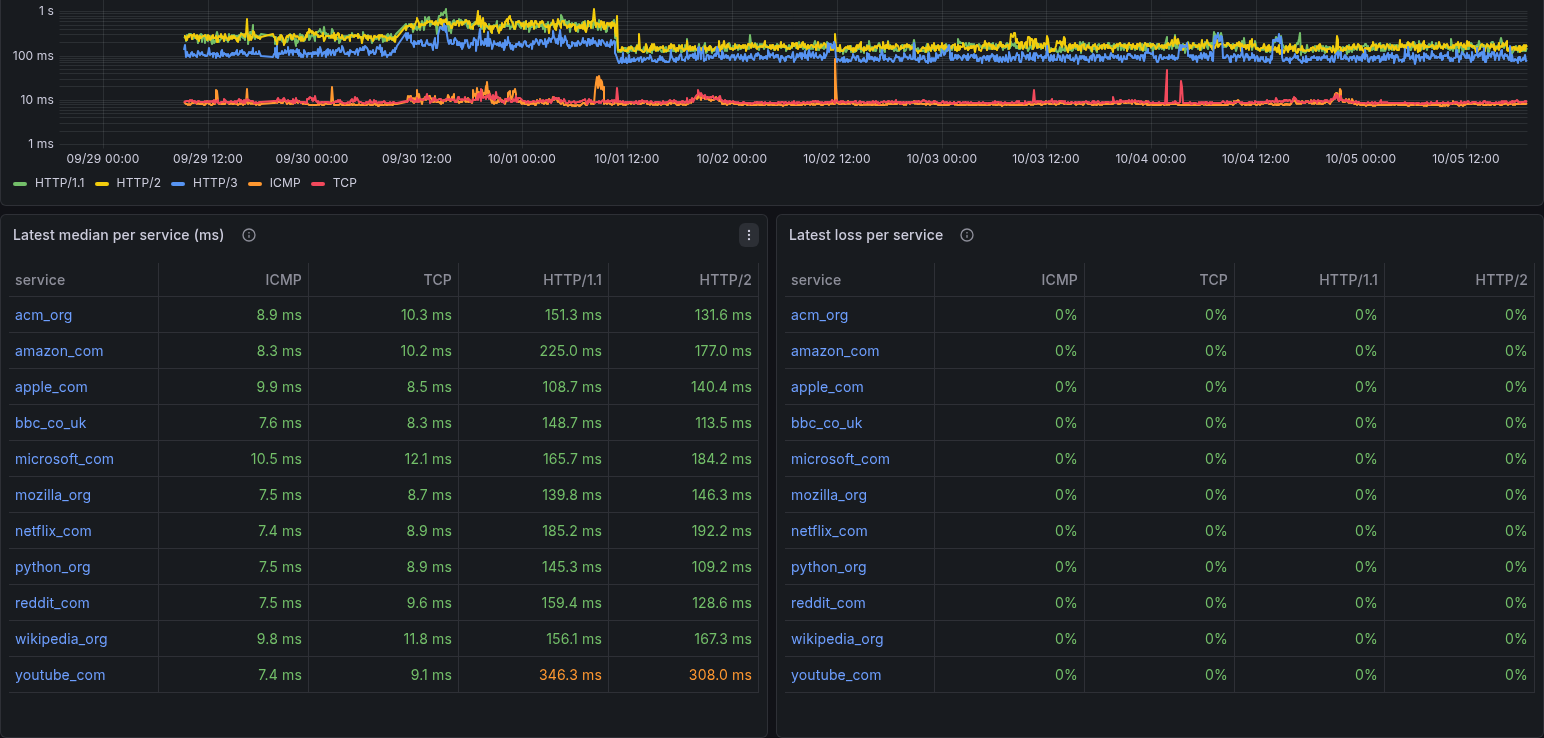
of the other dashboards. The DNS Wizard dashboard shows them:
- the median latency per protocol across the adopted services, on a logarithmic scale so ICMP's few milliseconds stay readable under HTTP's hundred or more;
- the latest median and loss per service and protocol. Median colors follow each protocol: ICMP and TCP turn orange at 80 ms and red at 200 ms, HTTP (which includes TLS and the server's answer) at 300 ms and 1 s. Click a service for its Target Detail, every layer of it.
The chart follows the dashboard's time range; the tables look at the last 30 minutes only, so a target that stops reporting drops out of them by itself.
How fast the house's queries resolve
The resolver probes in the other dashboards time a query SmokePing sends
every few minutes. The observer also sees the house's own queries, and
AdGuard logs how long each one took. The wizard keeps those times as a
histogram per 5-minute bucket, per path. A path is cache (AdGuard
answered from its cache), each upstream in DNS_UPSTREAMS, or upstreams
(every upstream together). It exports count and the 10th, 25th, 50th,
75th, 90th and 99th percentiles as the dns_resolution measurement, in
seconds like dns_latency. Only the Pi's own lookups are left out. The DNS
Wizard dashboard's How fast the house's queries resolve row shows:
- answers from upstream: the median over the 10th–90th percentile band, and the 99th percentile, which is what a person waits for on a cache miss;
- the share answered from AdGuard's cache;
- the median per upstream, so one resolver slowing down stands out from the network.
Queries AdGuard answers by itself (blocked or rewritten) have the path
local: they are exported but kept out of upstreams and of the
per-upstream panel, since no resolver was asked.
AdGuard writes its query log to disk in batches of 1,000 queries, so on a quiet network the times show up late, sometimes hours after the queries. A bucket is published as long as the observer keeps it (six hours), and rewritten as more of its queries arrive, so its percentiles can move for a while. Queries read more than six hours late are left out, and the observer's log says how many. A smaller batch would show everything sooner, at the cost of more frequent writes to the Pi's SD card, so the observer leaves AdGuard's default.
Queries (last hour) does not wait for the batch: it adds the queries AdGuard still holds in memory, read from its API (the entries newer than the log's last line), to those already in the log. It counts the last 12 five-minute buckets (55 to 60 minutes, the current one included), not the clock hour. The 24-hour count includes the queries in memory too; the 7-day volume and presence, which choose what to measure, come from the log alone. If AdGuard's API does not answer, the count falls back to the log and the observer logs it once. For the first hour after the upgrade that brought this, it counts from the upgrade on.
Each exported value is the percentile of one 5-minute bucket. Over a range wider than that, the panels average the buckets' percentiles, unweighted: close, but not the percentile of the whole period. A quiet bucket has few values, and under 100 queries its p99 is simply its slowest one.
These are timings only. No name leaves the Pi for them, whatever
DNS_EXPORT_NAMES says. Like the rest of the DNS Wizard dashboard, the row
needs InfluxDB.
For deeper analysis, tools/dns-explore (in the repository) reads the same
log offline. It compares five aggregation levels, three scores and several
K side by side, with day-over-day churn.
What it measures, and what it does not
It records DNS activity observed at the Pi, not traffic. That
foo.example was resolved at 10:02 does not mean an app transferred
anything from it. Several things break that inference:
- caches in the router, the OS and the app;
- prefetching and speculative resolution;
- CDNs and shared endpoints behind CNAMEs;
- many apps behind one name;
- SVCB/HTTPS records.
Coverage is partial, by design. Apps and systems that bring their own encrypted DNS never ask the router, so they bypass the observer entirely. Examples:
- browsers with DoH to a provider;
- Android Private DNS;
- iCloud Private Relay;
- VPNs;
- devices with a hard-coded
8.8.8.8.
The observer does not block port 853 or known DoH endpoints to force them through. Status says "network DNS only", and that is what it is.
Privacy
- Names stay on the Pi, in AdGuard's query log inside the
dns-observer-workvolume, forDNS_RETENTION_DAYS(7), and in the DNS wizard's summary (wizard.json, the top services) on thedns-observer-statevolume. They are never sent to the AI reports or put in alerts. They reach InfluxDB, and so Grafana, only if you setDNS_EXPORT_NAMES=1for the DNS wizard's table. The wizard's numbers carry no names and always go. - Client addresses are masked (
DNS_ANONYMIZE_CLIENTS=1, AdGuard'sanonymize_client_ip). In the router model every query comes from the router anyway. - The admin UI (AdGuard Home's own, with the query log and statistics)
listens on
127.0.0.1:3053by default, this machine only. Sign in assmokingpi;smoking-pi passwords --show-secretsshows the password and where to open it. Two ways in from another computer: - an SSH tunnel:
ssh -L 3053:localhost:3053 pi@192.168.1.10(the Pi's address), then open http://localhost:3053; - open it to the network, like the web admin and Grafana:
smoking-pi config set DNS_ADMIN_ADDRESS 0.0.0.0:3053, then http://192.168.1.10:3053. Anyone on the network who has the password then sees every name the house resolves.smoking-pi config unset DNS_ADMIN_ADDRESScloses it again.
Safety rules the configuration enforces
The supervisor merges these into AdGuard's AdGuardHome.yaml on every start.
Change them in the env file, not in the UI; the UI's other settings are kept.
- No loops. Upstreams, fallback and bootstrap resolvers must be public
addresses. The router forwards to the Pi, so the router as upstream sends
every query around in a circle. AdGuard's reverse lookups of private
addresses and its rDNS client names would also go to the router, so both
are turned off.
DNS_ALLOW_PRIVATE_UPSTREAM=1lifts the rule, for an internal resolver that does not forward back here. - No open resolver. Only private, loopback, link-local, ULA and CGNAT
(Tailscale) clients are answered. An empty
DNS_ALLOW_CLIENTSmeans the default. It never means "everyone", which is what AdGuard would read into an empty list. - No rate limit. Every query comes from the router's single address. AdGuard's default of 20 queries/s per /24 would throttle the whole house.
- Filtering off on first start (no block lists). If you turn blocking on in the UI, it stays on; that is your choice, not the observer's.
Settings
All optional except the password; in the env file (smoking-pi config set).
| Key | Default | |
|---|---|---|
DNS_ADMIN_PASSWORD |
generated | AdGuard admin UI password; re-hashed on each start, so it can be rotated |
DNS_UPSTREAMS |
https://1.1.1.1/dns-query,https://8.8.8.8/dns-query |
Any AdGuard upstream spec (tls://, quic://, h3://) |
DNS_FALLBACK |
1.1.1.1,8.8.8.8 |
Plain DNS when every upstream fails; none for no fallback |
DNS_BOOTSTRAP |
1.1.1.1,8.8.8.8 |
Resolves upstream hostnames; never the router |
DNS_UPSTREAM_TIMEOUT_MS |
2000 |
Per upstream, before the next one |
DNS_ALLOW_CLIENTS |
private ranges | Comma-separated CIDRs answered |
DNS_BIND / DNS_PORT |
0.0.0.0 / 53 |
Where it listens |
DNS_RETENTION_DAYS |
7 |
Query log and statistics |
DNS_ANONYMIZE_CLIENTS |
1 |
Mask client addresses |
DNS_CANARY_VIA |
auto |
Where the canary is asked: auto (default gateway), off, or an address |
DNS_CANARY_DOMAIN |
canary.smoking-pi.home.arpa |
Change it if the router answers it itself (smoking-pi dns test says so) |
DNS_CANARY_INTERVAL / DNS_CANARY_MISSES |
300 / 3 |
~15 min to not_receiving |
DNS_QUIET_AFTER |
1800 |
Silence before quiet/idle |
DNS_WIZARD_INTERVAL |
600 |
Seconds between DNS wizard passes; 0 turns it off |
DNS_WIZARD_TOP |
25 |
Services in the wizard's top list |
DNS_WIZARD_EXCLUDE |
(none) | More names to leave out, comma list (.suffix or a domain) |
DNS_WIZARD_TARGETS |
/smokeping-config/Targets |
SmokePing's generated targets; the names it measures are left out as the Pi's own |
DNS_WIZARD_SCORE |
auto |
What ranks services for the selection: auto, presence or queries |
DNS_WIZARD_COVERAGE |
0.8 |
Share of the activity the selected services cover |
DNS_WIZARD_FLOOR |
0.005 |
A network or CDN with at least this share gets a service |
DNS_WIZARD_MAX |
60 |
Most services selected, and most kept measuring |
DNS_EXPORT_NAMES |
0 |
1 puts the top services' names in InfluxDB for the wizard's table |
DNS_ADMIN_ADDRESS |
127.0.0.1:3053 |
Admin UI listen address; 0.0.0.0:3053 opens it to the network |
Turning it off
See Undo: point the router back first, then smoking-pi dns
disable. The query log stays in the volumes until smoking-pi purge.